Diaspora Trade ConnectionUser guide Open the site

How to use Diaspora Trade Connection

Island products on diaspora shelves. Global suppliers for island shops.

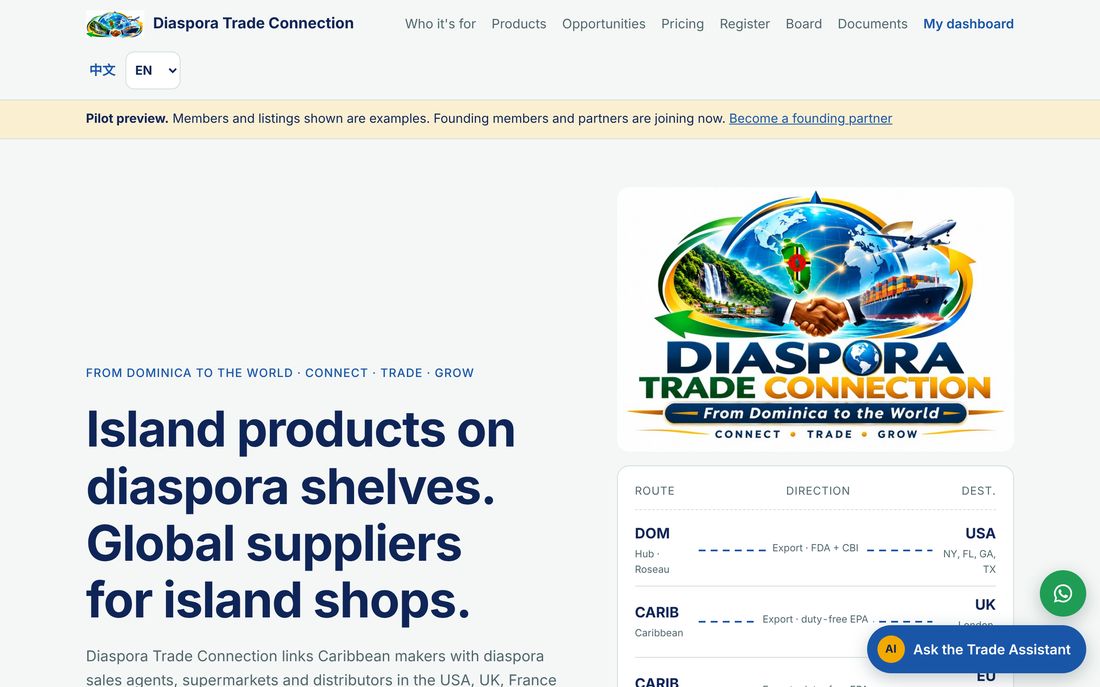
Diaspora Trade Connection (DTC) connects Caribbean makers with diaspora buyers, sales reps and distributors in the USA, UK, France and Canada. It also helps island shops source from Africa, China and Latin America. This guide shows every feature, step by step, with pictures.

The Diaspora Trade Connection home page on a computer

01Getting started

You don't need to install anything. Open the website on your phone or computer. You can read the guides and browse the board without an account.

What you can do

๐ŸŒด

Sell

List island products and find diaspora buyers, reps and distributors.

๐Ÿ“„

Get export-ready

Checklists, route guides and ready-made export documents.

๐Ÿค

Match

Get suggested buyers, makers and suppliers for your route.

๐Ÿšข

Ship and source

Pooled shipping, and buying from Africa, China and Latin America.

Finding your way around

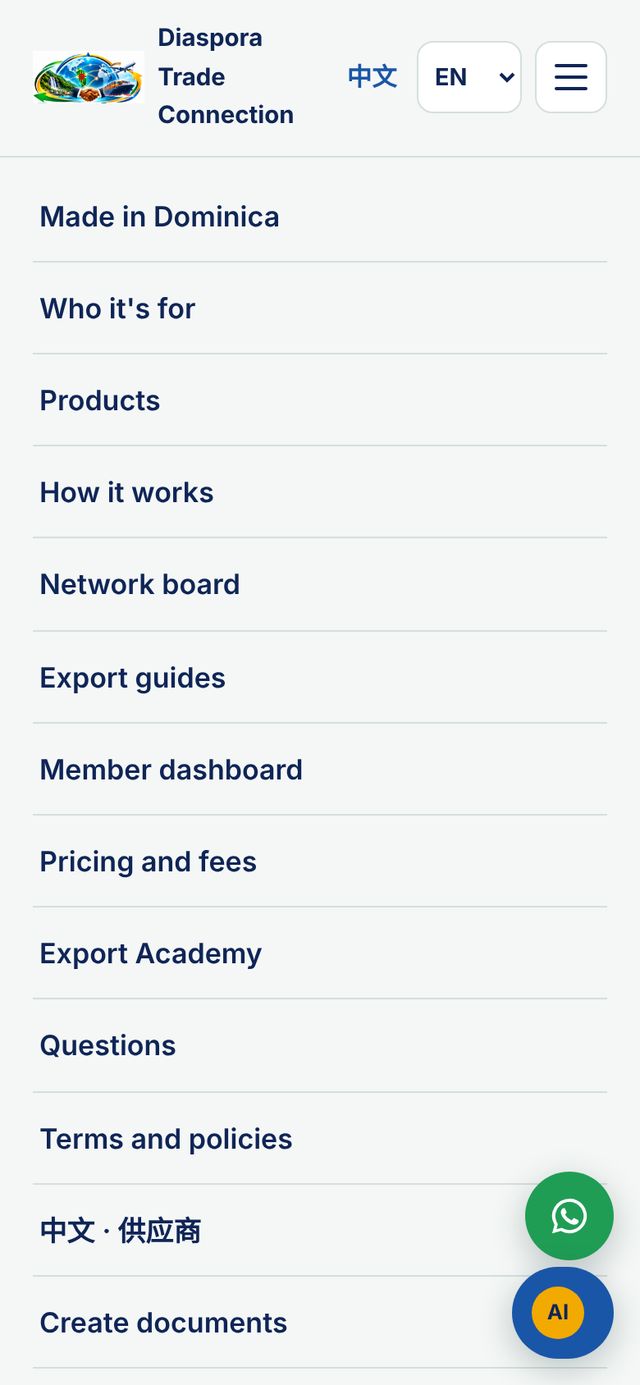
  • On a phone, tap the โ˜ฐ menu (top right) to jump to Who it's for, Products, Network board, Export guides, Member dashboard, Pricing, Documents and more.
  • On a computer, the same links sit along the top bar.
  • The language box (EN) switches between English, French and Spanish. ไธญๆ–‡ opens the page for Chinese suppliers.
  • The AI button (bottom right) opens the Trade Assistant. The green button opens WhatsApp.
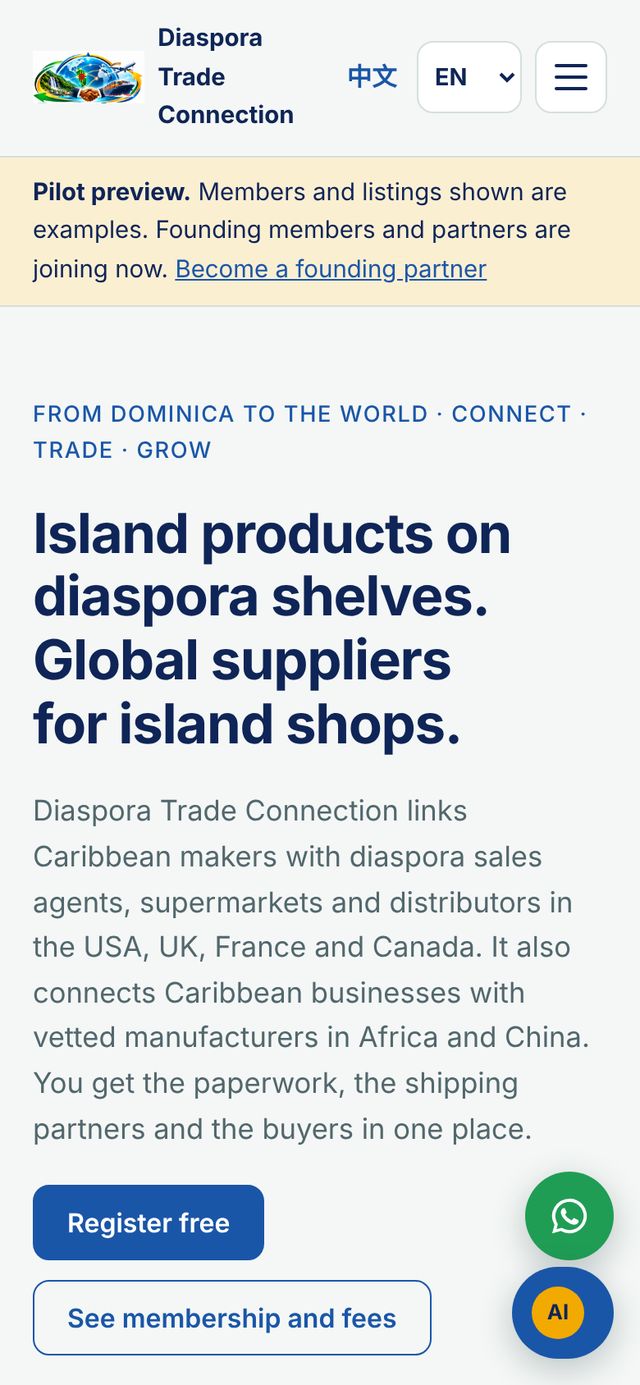
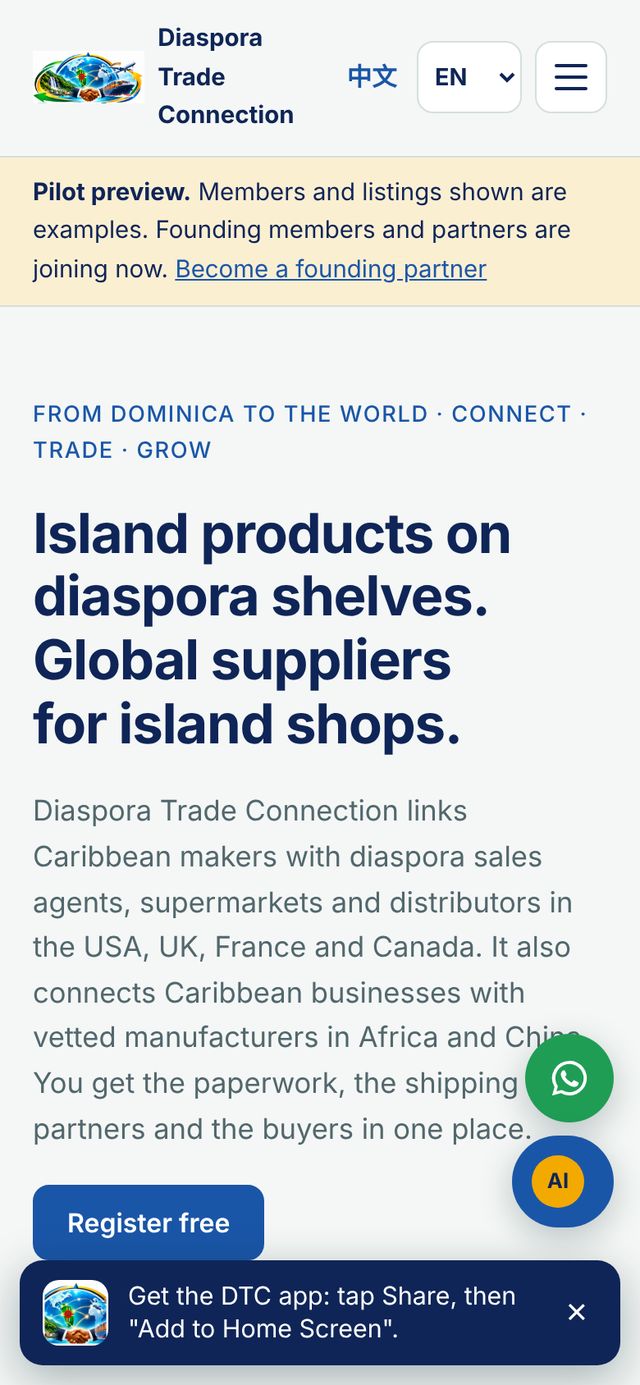
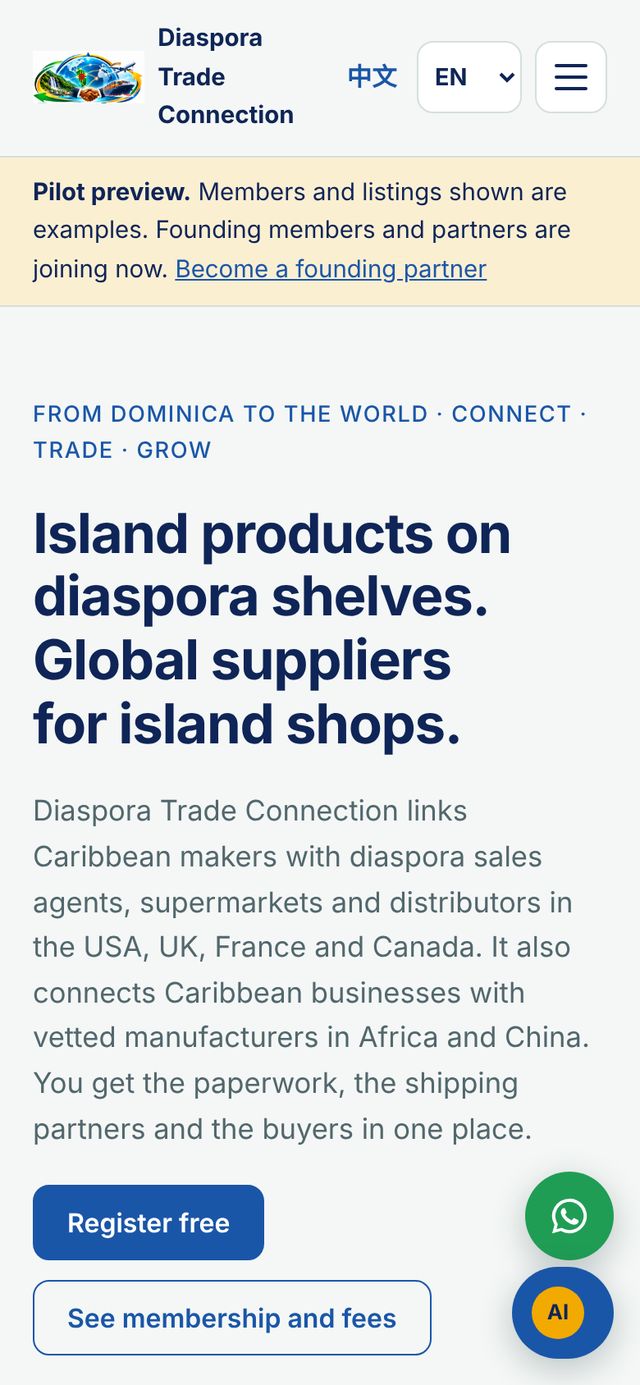
Home screen on a phone
The home screen on a phone.
The phone menu opened
The โ˜ฐ menu, opened.

02Pick your role

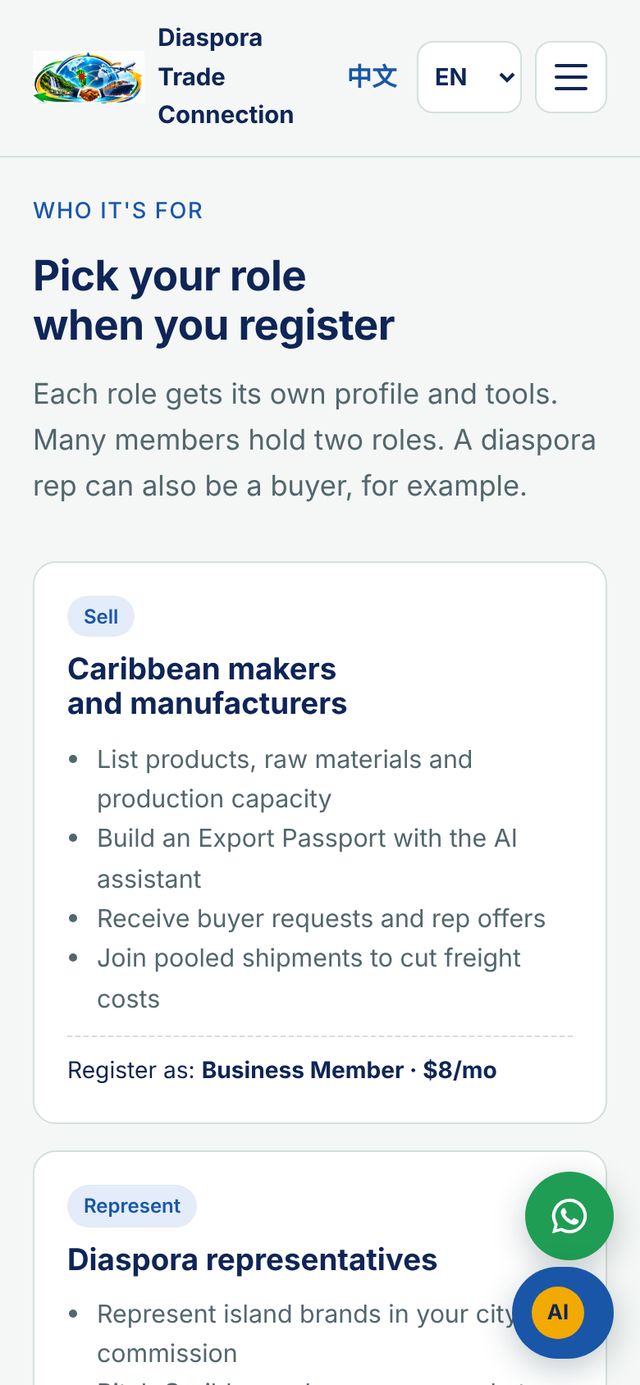
Everyone joins as a role. Each role gets its own profile and tools. Many members hold two roles, for example a diaspora rep who is also a buyer.

RoleWhat you do here
Caribbean makers and manufacturersList products, build your Export Passport, get buyer requests and rep offers, join pooled shipments.
Diaspora representativesRepresent island brands in your city and earn commission on the deals you bring.
Supermarkets, wholesalers and retailersFind export-ready island products and post buyer requests.
Distributors and importersTake on brands for a territory and order in volume.
African and Chinese manufacturersSell to Caribbean shops and importers through verified listings.
Caribbean importers and shop ownersSource goods and raw materials, alone or in pooled orders.
Logistics and compliance partnersForwarders, brokers, US Agents and Responsible Persons who get steady, prepared work.
Artists and creativesLicense Caribbean music and creative work to diaspora businesses.
The Who it's for section
Each role card lists what that member gets.

03Join the network

Joining takes about two minutes and starts free.

  1. Tap Register free on the home page, or Register in the menu.
  2. I'm joining as. Choose your main role. You can add more roles later in your profile.
  3. Enter your full name, email, business or brand, and where you are based.
  4. Pick your main trade route, for example Caribbean โ†’ USA, or Africa โ†’ Caribbean.
  5. Pick a plan. Explorer is free; you can upgrade at any time.
  6. Tap Register. Your dashboard opens with your next steps.
Founding members. People who join during the pilot are contacted about founding-member pricing and first introductions on their route.
Test mode. During the pilot your dashboard is saved on the device you use. Logins and cloud accounts come with the live site, so use the same phone or computer for now.
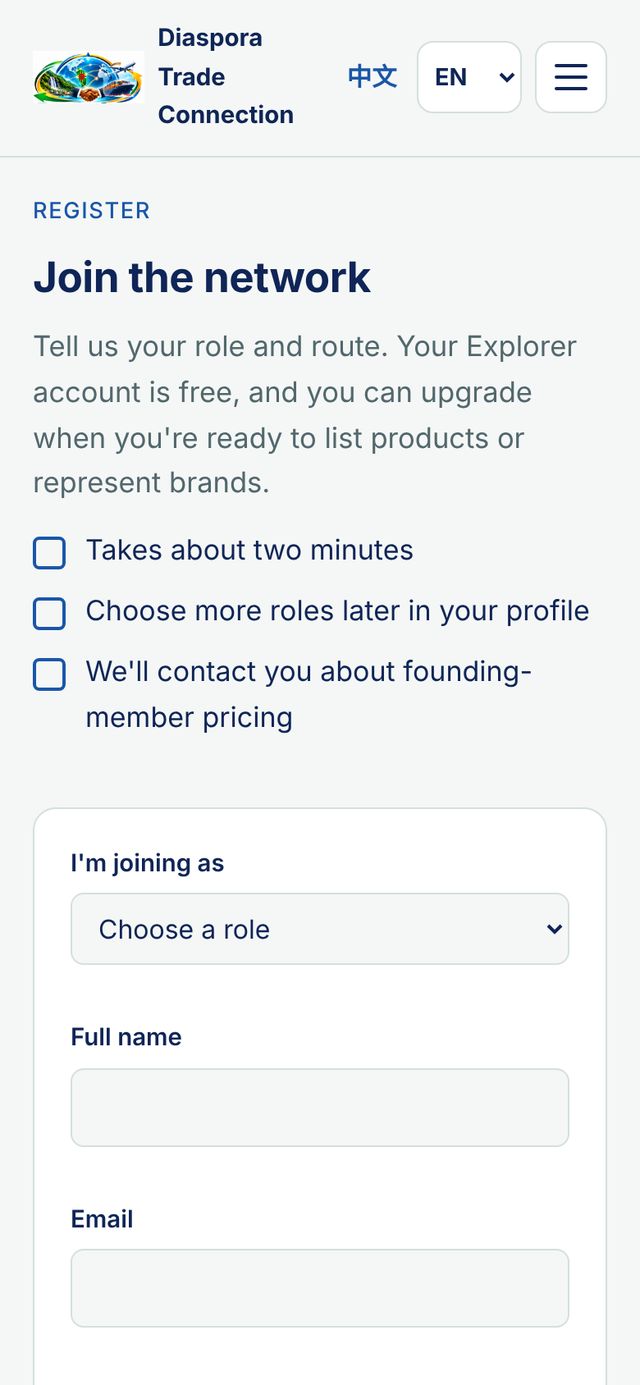
The registration form
The Join the network form.

04Plans and what they unlock

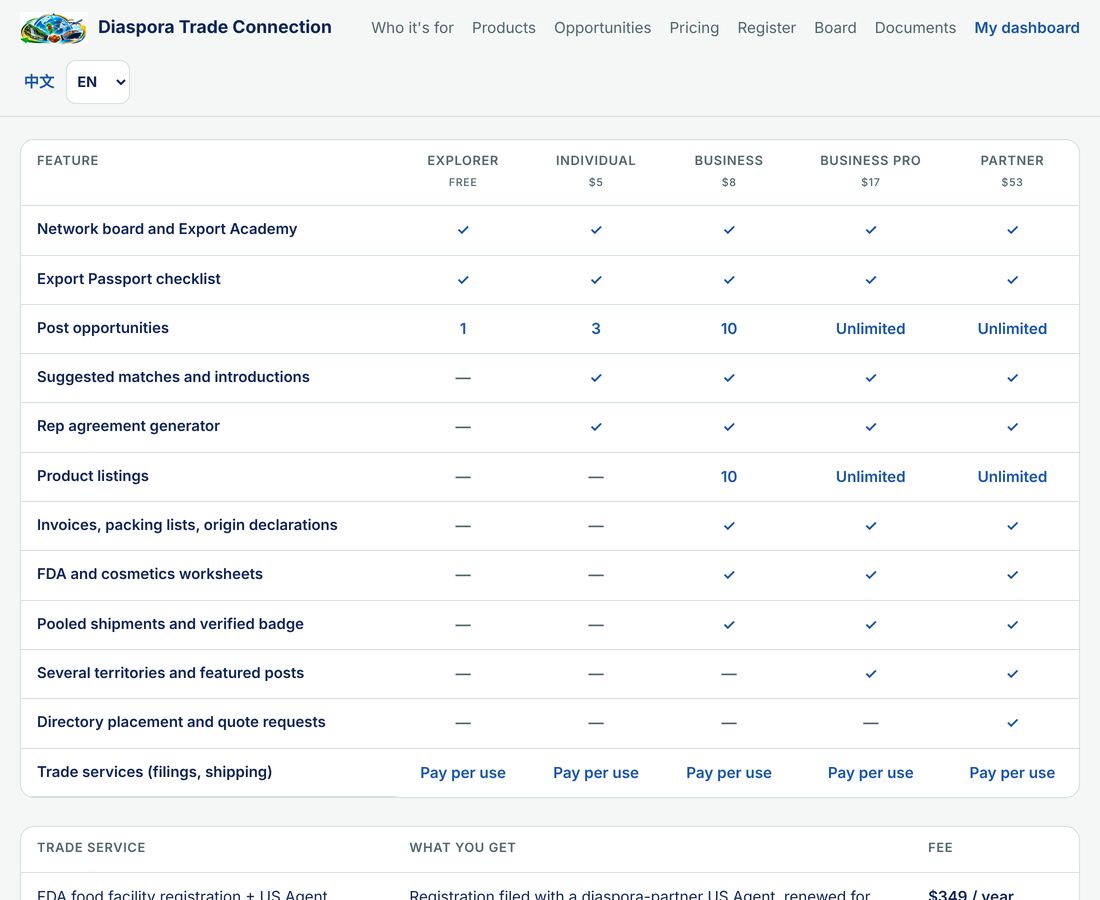
Membership is small and monthly. Trade services are paid only when you use them. All prices are in US dollars.

PlanPriceBest forWhat it adds
ExplorerFreeEveryoneNetwork board, Export Academy guides, Export Passport checklist, 1 opportunity post
Individual$5 / moReps, artistsSuggested matches and introductions, rep agreement generator, up to 3 opportunity posts
Business$8 / moMakers, shopsUp to 10 product listings, the full document generator, pooled shipments, up to 10 posts
Business Pro$17 / moDistributors, factoriesUnlimited listings and posts, several territories, featured posts, 10% off every service
Partner$53 / moLogistics, agenciesDirectory placement, quote requests, programme sponsorship, 10% off every service

Upgrading

  1. Open a locked tab in your dashboard (it shows a ๐Ÿ”’) or go to Pricing.
  2. Tap Upgrade to โ€ฆ. Your new tools unlock right away.
  3. You can also change plan in Profile โ†’ Membership.
Free during testing. While the site is in its test phase, upgrades cost nothing, so you can try every feature.

The What each plan unlocks table on the Pricing page compares every feature side by side.

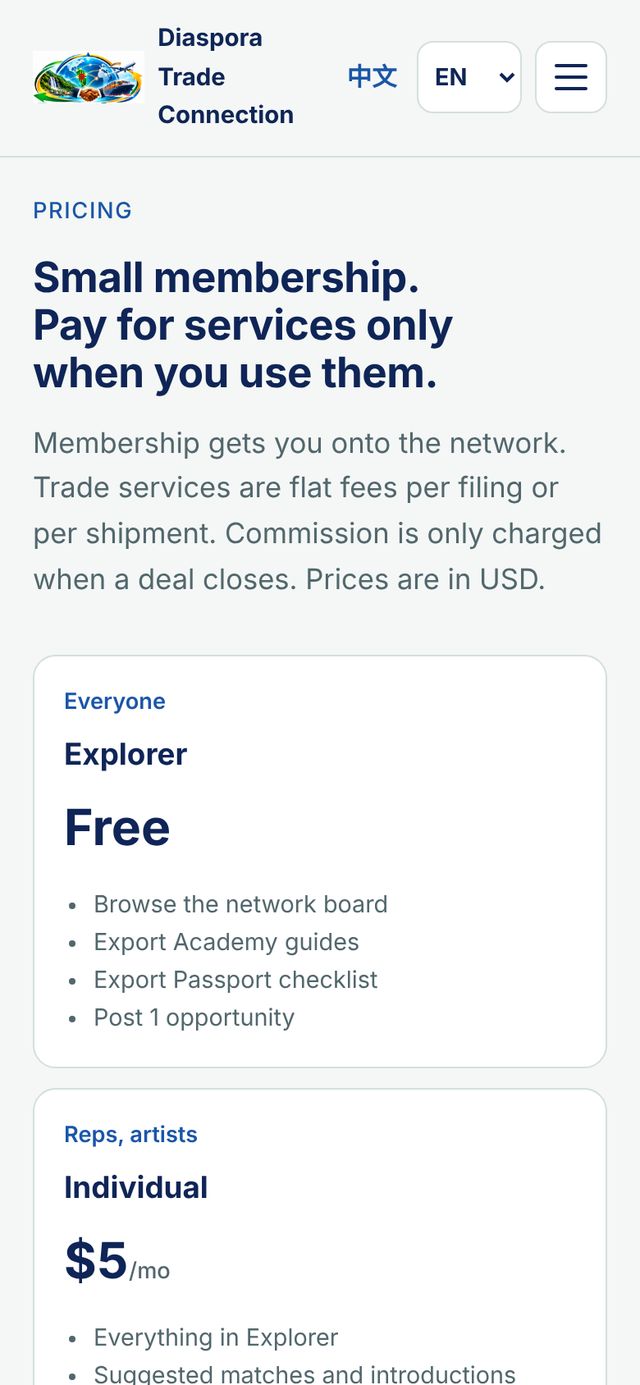
Pricing plans on a phone
The plans on the Pricing page.
Plan comparison table
The plan comparison table.

05Your dashboard

Your dashboard is your home base. Open it from My dashboard in the menu. It has seven tabs.

TabWhat it's forPlan
OverviewYour progress tiles, quick document buttons and your next steps.All
Export PassportYour checklist of everything needed for your route.All
My listingsYour products, with pack size, minimum order, price and photo.Business+
My opportunitiesRequests and offers you post to the network.All
DocumentsThe document generator.Individual+
MatchesMembers suggested for you.Individual+
ProfileYour details, role, route and plan.All

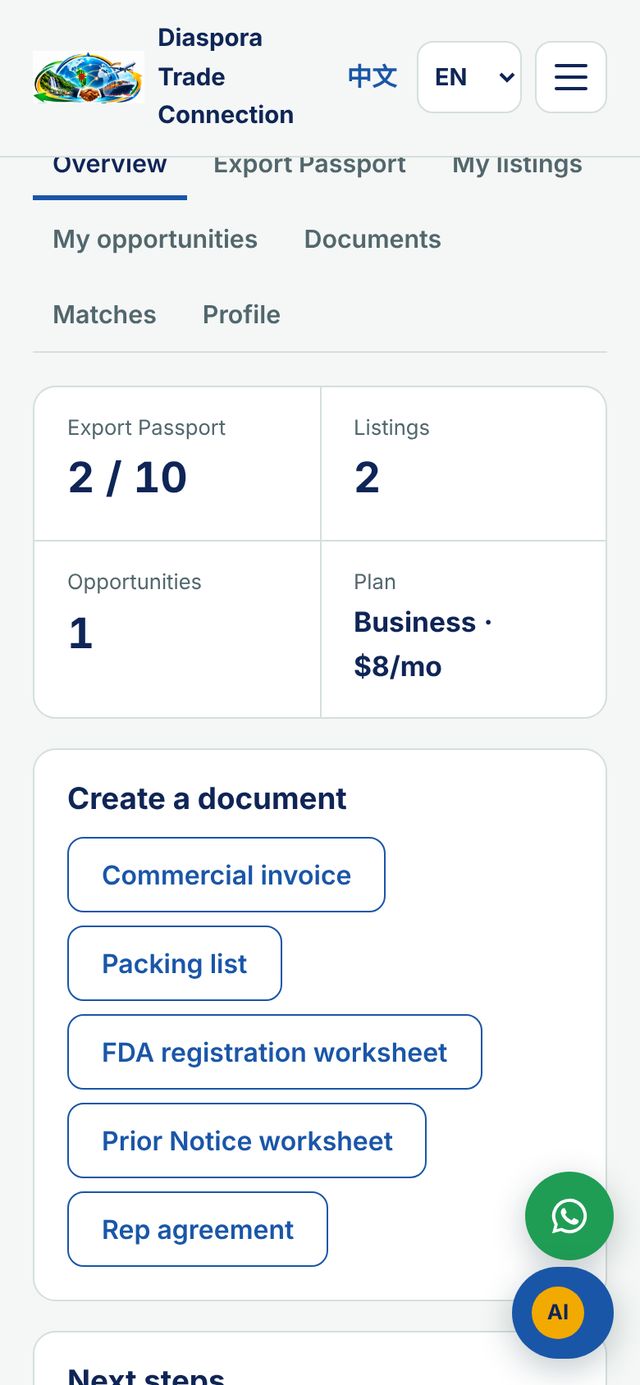
The overview tiles

  • Export Passport: how many checklist items are done, e.g. 2 / 10.
  • Listings and Opportunities: how many you have posted.
  • Plan: your current membership.

Under the tiles, Create a document has one-tap buttons for the documents you need most. Next steps lists what to do next, each with a Go button.

Dashboard overview
The dashboard overview. (Example member.)

06Export Passport

The Export Passport is a checklist of everything your product needs before it can be sold on your route: registrations, labels, proof of origin and partners.

  1. Open the Export Passport tab.
  2. Choose your trade route, for example Caribbean โ†’ USA or Caribbean โ†’ UK. Each route has its own list.
  3. Tick each item as you finish it. The bar shows how far you are.
  4. Items marked To do link to the matching Export Academy guide, or DTC can do them for you (see Services and fees).

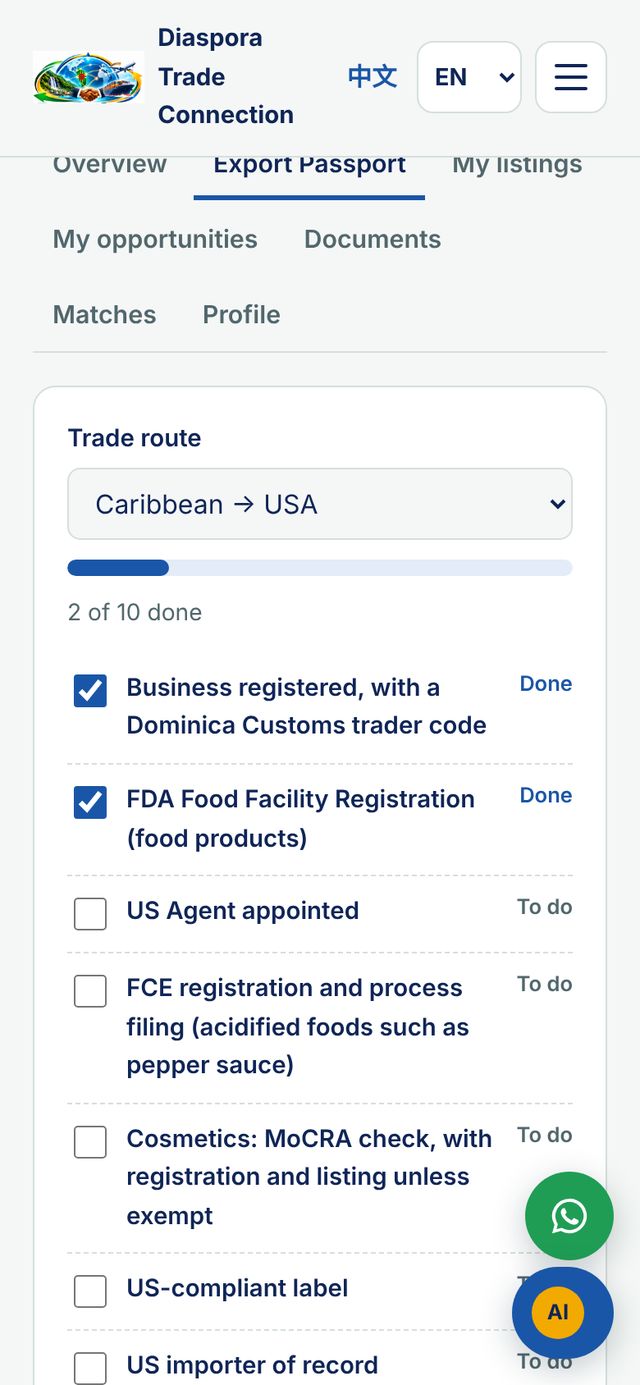
For the USA, the list includes your business and Customs trader code, FDA Food Facility Registration, a US Agent, FCE and process filing for acidified foods such as pepper sauce, MoCRA for cosmetics, a US-compliant label, a US importer of record and Prior Notice before each shipment.

Tip. Buyers trust makers with a fuller passport. Finish the passport before you ask for introductions.
Export Passport checklist
The Caribbean โ†’ USA checklist, 2 of 10 done.

07List your products

Listings show buyers and distributors what you make and how much you can supply. Business members can list up to 10 products; Business Pro and Partner have no limit.

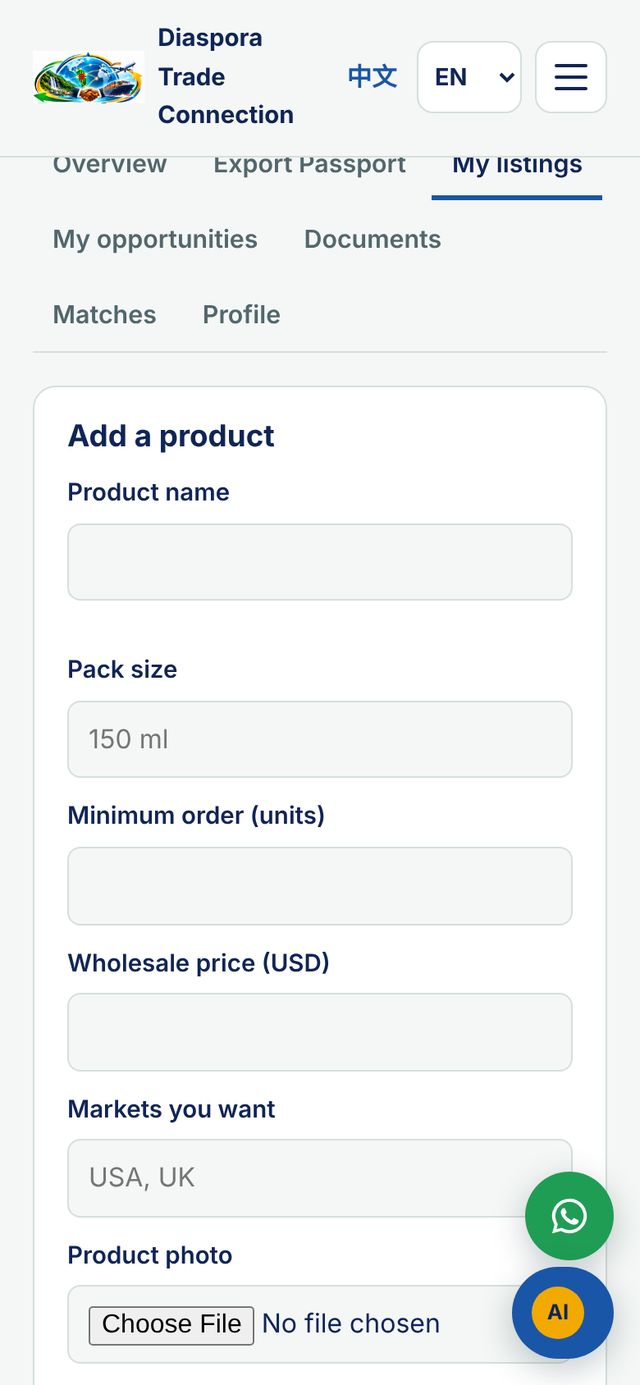
  1. Open My listings and find Add a product.
  2. Enter the product name, pack size (e.g. 150 ml) and minimum order in units.
  3. Add your wholesale price in USD and the markets you want (e.g. USA, UK).
  4. Add a product photo.
  5. Tick Made in Dominica if it applies.
  6. Tap Add listing. Remove a product at any time with Remove.
The Made in Dominica badge shows as pending verification until DTC checks your business. Once approved, buyers see the badge on your listing.
Add a product form
The Add a product form.

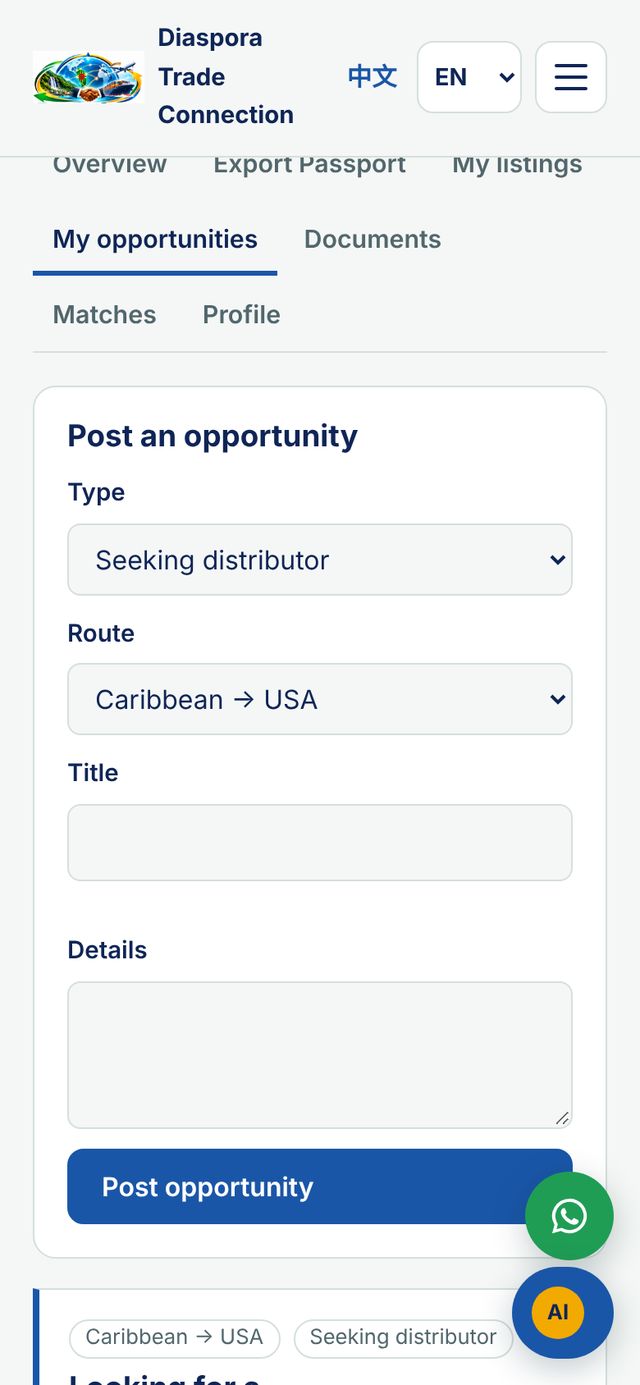
08Post opportunities

An opportunity is a request or offer the whole network can see: "seeking a distributor in New York", "buyer request", "pooled order", "freight quote request" and more.

  1. Open My opportunities.
  2. Choose the type, for example Seeking distributor, Seeking rep, Buyer request, Pooled order or Freight quote request.
  3. Choose the route.
  4. Write a short title and the details: product, quantity, how often, and where you are with paperwork.
  5. Tap Post opportunity. It appears in your list and on the network board.

Explorer can post 1 opportunity, Individual 3, Business 10. Business Pro and Partner have no limit.

Write it like a buyer would search. Name the product, the size, the city and the volume: "Pepper sauce, 150 ml, 2 pallets a month, Brooklyn."
Post an opportunity form
The Post an opportunity form.

09Create export documents

The document generator fills in your export paperwork from your answers. Your answers are saved and reused, so the second document takes seconds. Open it from Documents in the menu or the dashboard.

DocumentUsed forPlan
Commercial invoiceCustoms clearance and payment, on every shipmentBusiness+
Packing listWhat is in each carton, with weightsBusiness+
Declaration of originSupporting proof that goods were made in the CaribbeanBusiness+
FDA Food Facility Registration worksheetEverything you need to register with the FDA, in one placeBusiness+
FDA acidified food (FCE/SID) worksheetPepper sauce and other acidified foodsBusiness+
FDA Prior Notice worksheetThe details needed before each food shipment to the USBusiness+
Cosmetic notification worksheetMoCRA, Health Canada, UK SCPN and EU CPNP filingsBusiness+
Representation agreementA written deal between a maker and a diaspora repIndividual+

Two ways to fill it in

  1. Pick the document in Which document?
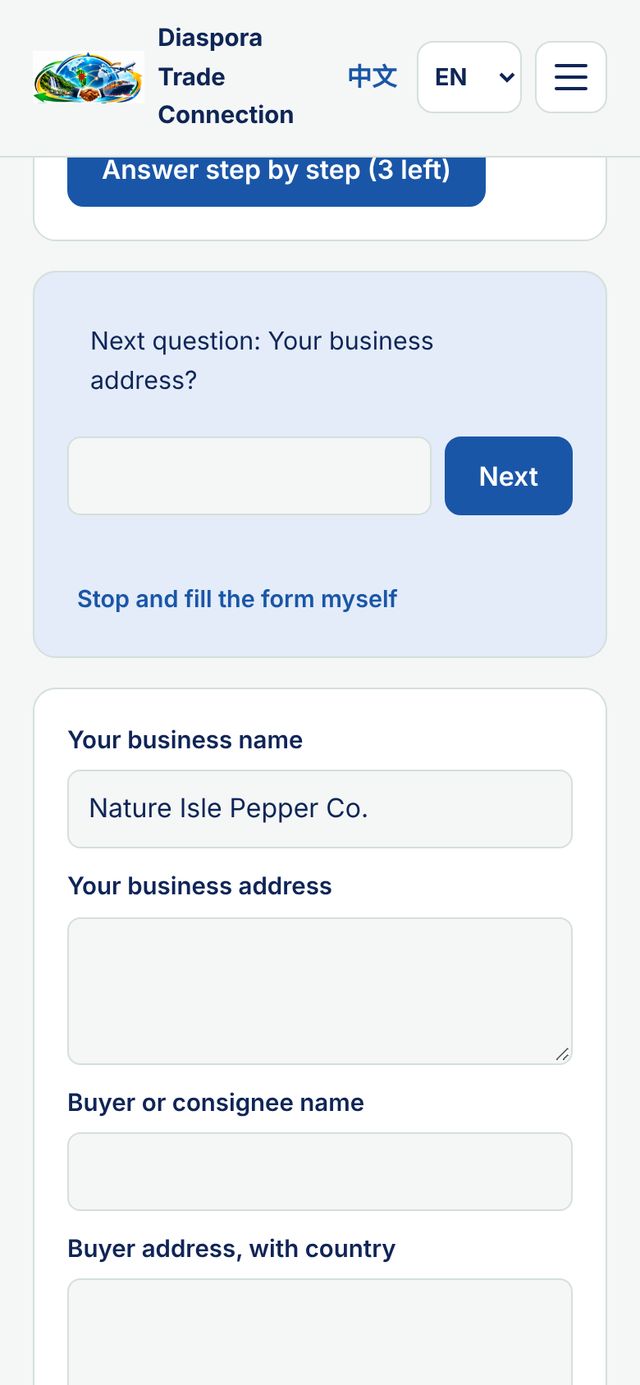
  2. Step by step: tap Answer step by step. One question shows at a time; type the answer and tap Next. Tap Stop and fill the form myself at any time.
  3. Or fill the form: type straight into the fields below. Add each item with its description, HS code, quantity, unit price and weight. Tap + Add item for more lines.
  4. Tap Create document. A preview appears.
  5. Tap Download to save it, or Copy text to paste it into an email.
Make a PDF. Open the downloaded file and use Print โ†’ Save as PDF.
Check before you send. Worksheets prepare your information; the official filing is done on the government site (e.g. FDA) or by DTC for you. Your products come from your listings, so keep them up to date.
Step-by-step mode
Step-by-step mode asks one question at a time.
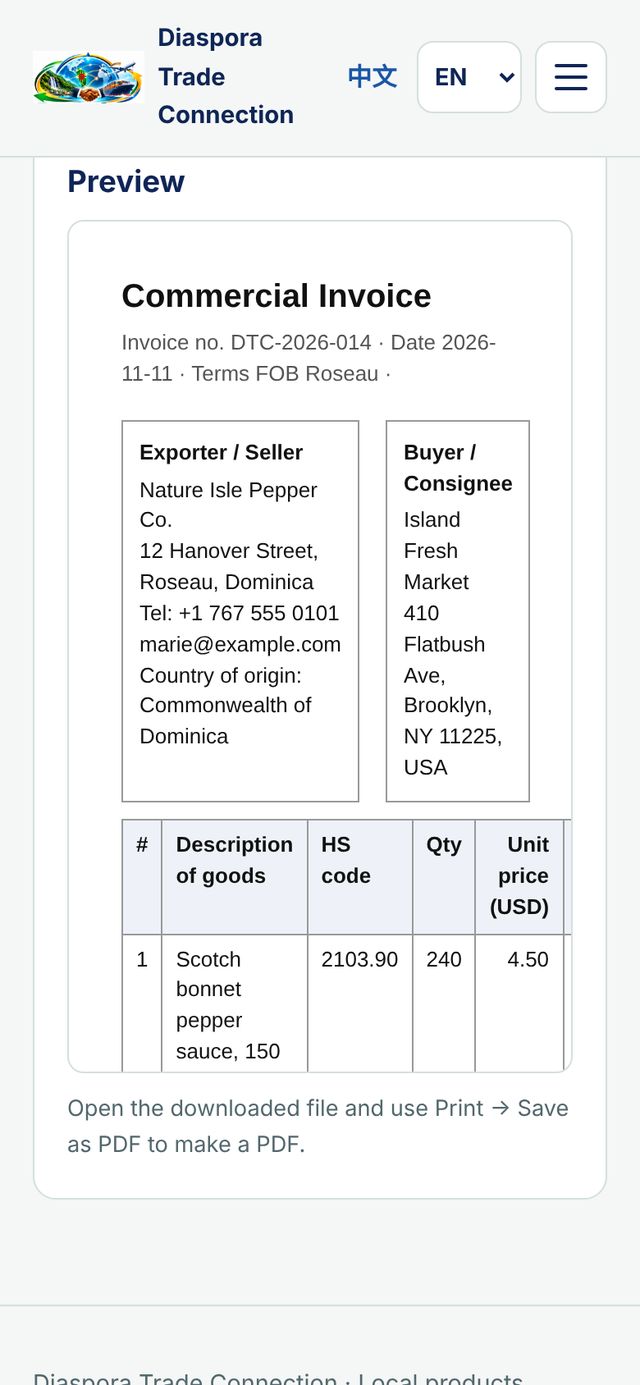
Commercial invoice preview
A finished commercial invoice. (Example data.)

10Matches

DTC suggests members who fit with you. A maker sees reps and buyers; a buyer sees makers; an importer sees suppliers.

How matches are chosen

  • Complementary role: someone who needs what you offer, e.g. a rep for a maker.
  • Same trade route: e.g. both on Caribbean โ†’ USA.
  • Shared interests: words in common, such as "sauce" or "skincare", from your listings and profile.

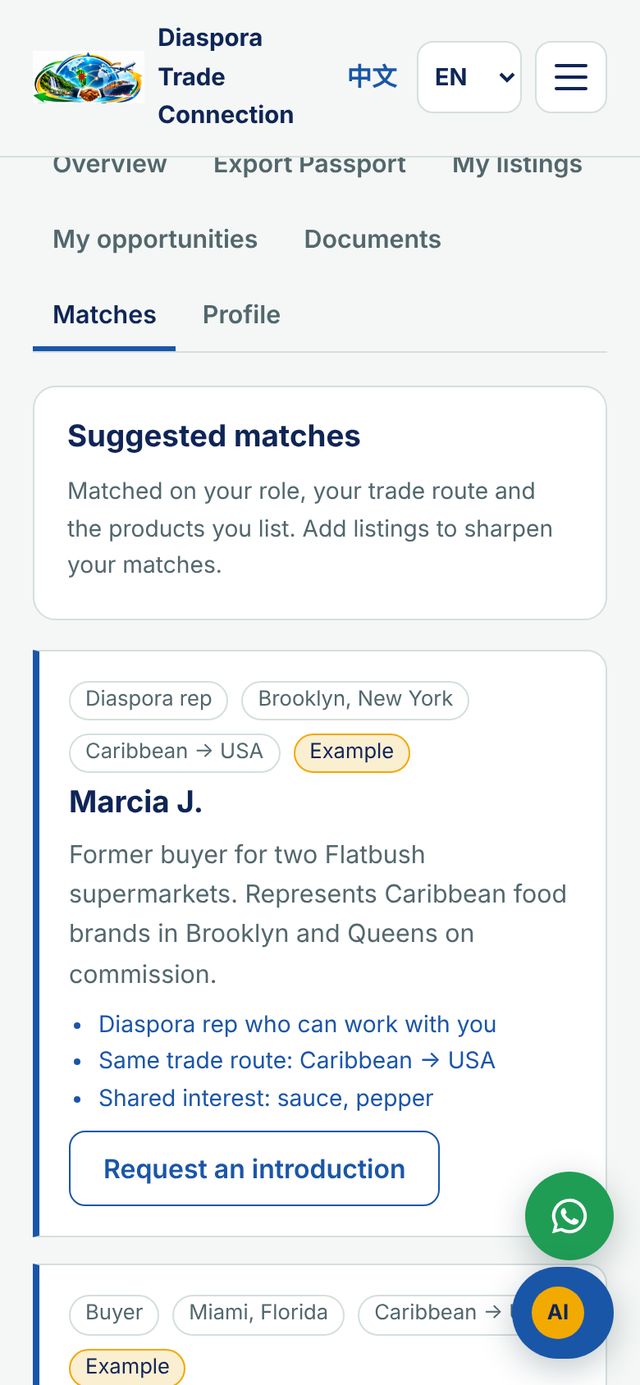
Each match card says why it was suggested. Tap Request an introduction and DTC connects you.

Sharper matches. Set your role and route in Profile and add listings. The more you fill in, the better the matches.
Suggested matches
Suggested matches, with the reasons listed.

11Network board

The network board shows members and open opportunities across every route. Anyone can browse it.

  1. Tap Network board in the menu.
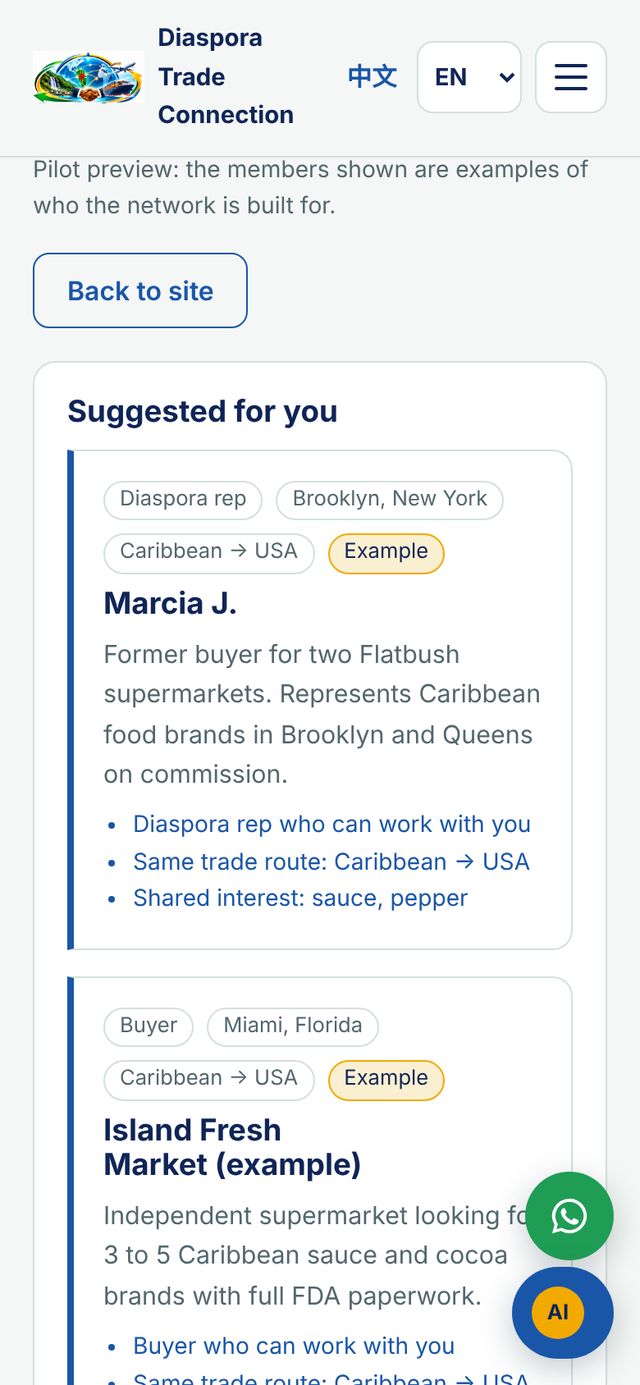
  2. Suggested for you (Individual and up) shows the members who best fit you.
  3. Filter by role and route, or type in Search, e.g. skincare, Toronto or cocoa.
  4. Your own posted opportunities show at the bottom.
Pilot preview. Members marked Example show who the network is built for. Real members replace them as people join.
The network board
The board, with suggested members.

12Export Academy

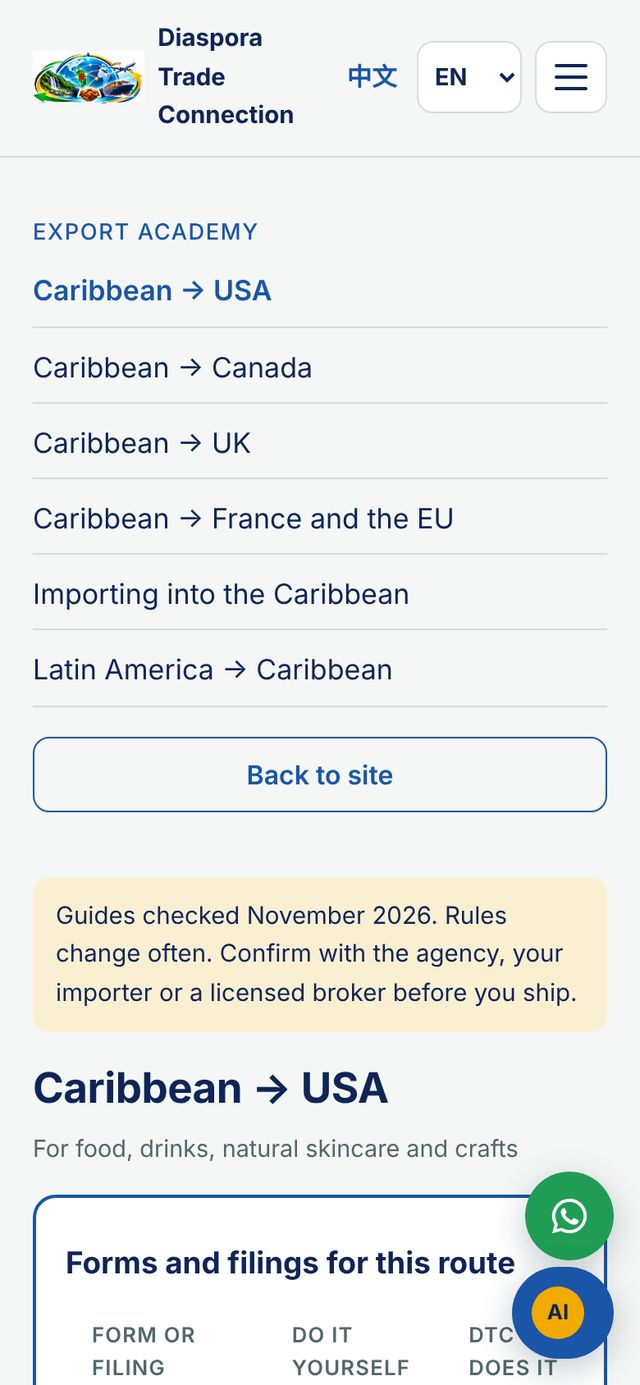
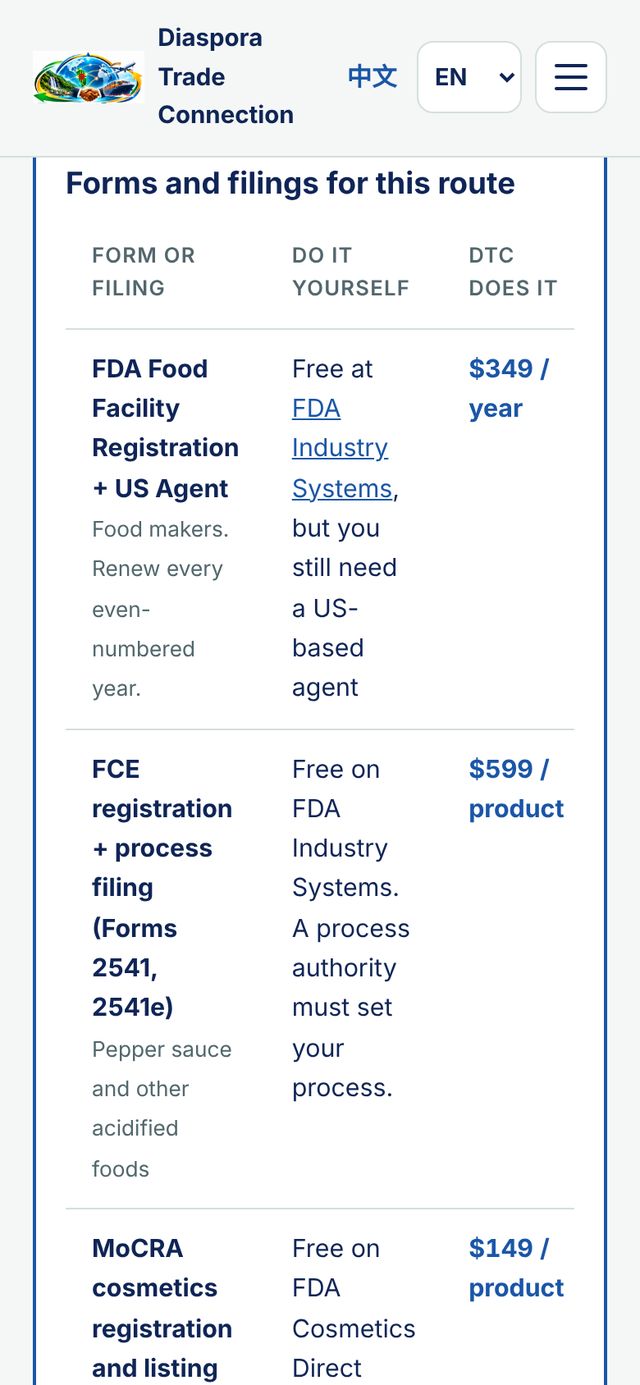
Plain-language guides for each route, checked against official sources. Each guide ends with a table of every form, how to do it yourself, and DTC's price to do it for you.

The guides

  • Caribbean โ†’ USA: FDA registration and US Agent, acidified foods, MoCRA for cosmetics, Prior Notice, labels, CBI duty-free entry.
  • Caribbean โ†’ Canada: cosmetic notification, Safe Food for Canadians importer, bilingual labels.
  • Caribbean โ†’ UK: Responsible Person, SCPN, EUR.1 for duty-free entry.
  • Caribbean โ†’ France and the EU: CPNP, French labels, Martinique and Guadeloupe.
  • Importing into the Caribbean: duty, VAT and the landed-cost calculator (see section 13).
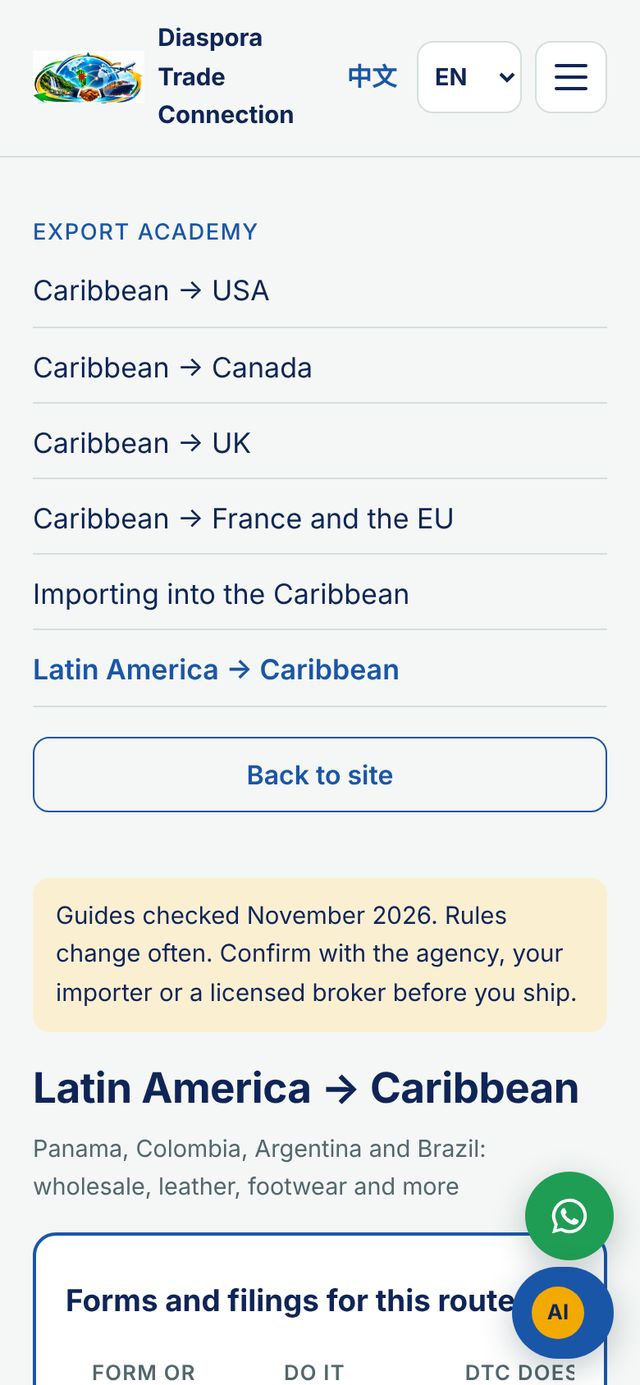
  • Latin America โ†’ Caribbean: Panama, Colombia, Argentina and Brazil (see section 14).

Forms and filings for this route

Each row has three columns: the form, how to do it yourself (with the official link, often free), and what it costs if DTC does it. Buttons under the table take you to the document generator or to Pricing.

Rules change. Each guide shows the date it was checked. Confirm with the agency, your importer or a licensed broker before you ship.
Export Academy guide list
The Export Academy guides.
Forms and filings table
Forms and filings for Caribbean โ†’ USA.

13Importing into the Caribbean

For island shops and importers buying from Africa, China, Latin America or anywhere else. Open Export guides โ†’ Importing into the Caribbean.

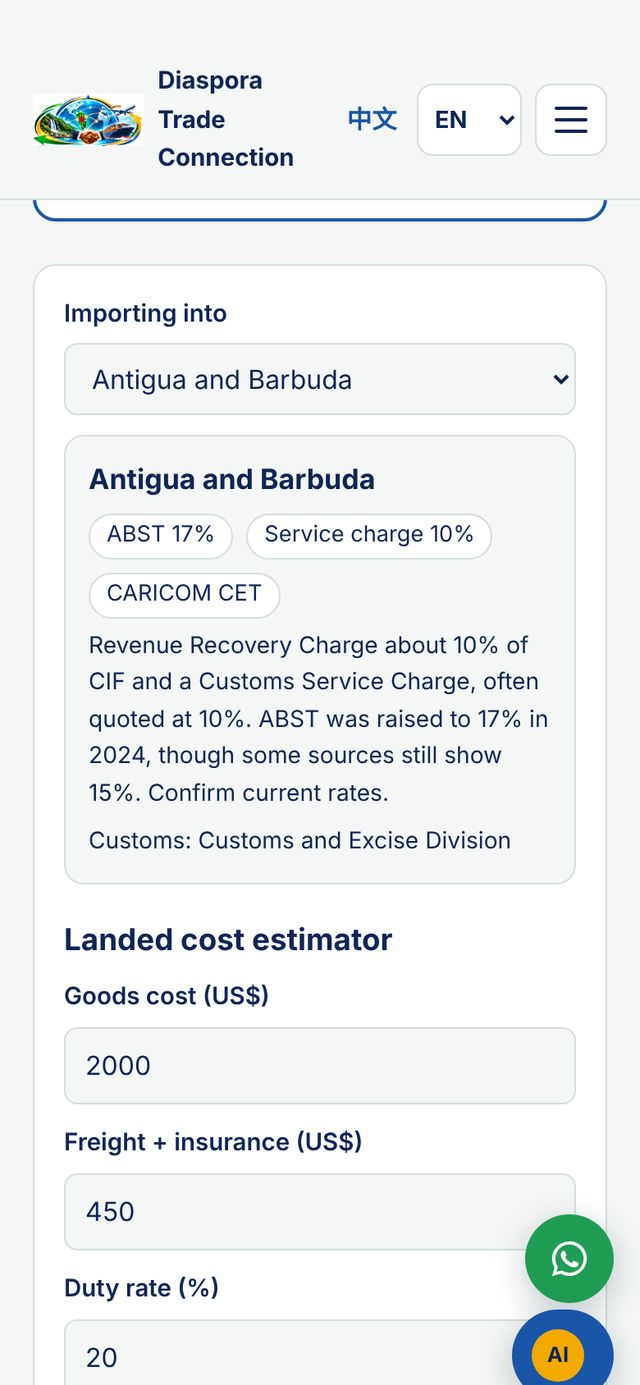
  1. Pick your island in Importing into: Dominica, Antigua and Barbuda, St Lucia, Grenada, St Vincent, St Kitts and Nevis, Barbados, Jamaica, Trinidad and Tobago or Guyana.
  2. The panel shows that country's VAT, service charges and customs office.
  3. In the Landed cost estimator, enter the goods cost, freight and insurance, and the duty rate for your goods.
  4. The tax rates fill in for your island. The total shows what the goods really cost you, landed.
How it's worked out. Duty is charged on the cost plus freight and insurance (CIF). VAT is then charged on CIF plus duty and other charges.
An estimate only. Your customs broker confirms the final figure. Duty rates depend on the HS code of your goods.
Landed cost calculator
The country picker and landed-cost estimator.

14Latin America sourcing

Leather, shoes, clothing and wholesale goods from Panama (Colรณn Free Zone), Colombia, Argentina and Brazil, shipped to the islands.

  • The guide explains the main shipping paths, including through Cartagena, Colรณn, Miami or Trinidad, and gives freight benchmarks.
  • Post a Freight quote request from your dashboard (My opportunities). It's free.
  • Use supplier verification before you pay a new supplier, and an inspection for first orders.
  • Join a pooled shipment to share a container and cut the cost per box.
Small order? Pooled sourcing combines several island buyers into one order that meets the factory minimum.
Latin America guide
The Latin America โ†’ Caribbean guide.

15Services and fees

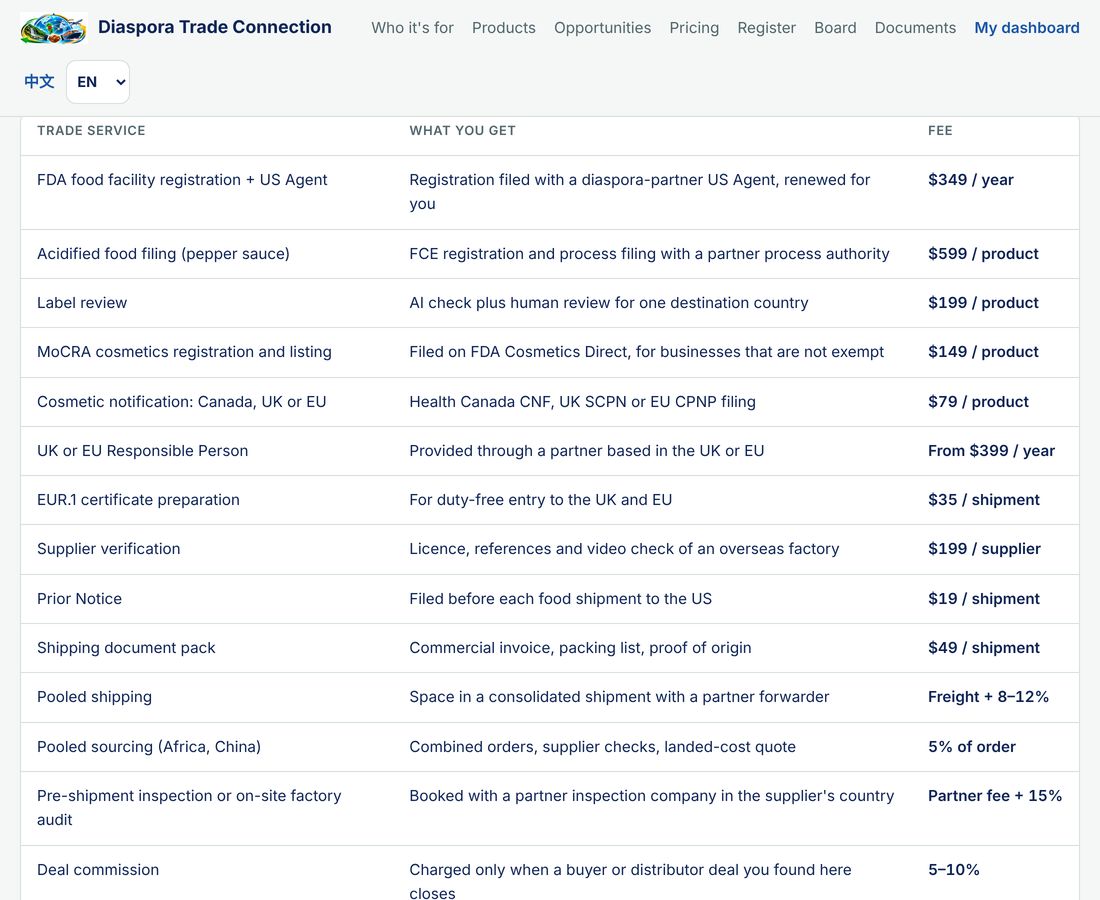
Don't want to file it yourself? DTC does it for a flat fee, set at or below what specialist firms charge. Business Pro and Partner members get 10% off every service. Government fees, if any, are passed on at cost.

Trade services price table
The trade services table on the Pricing page.

How to order a service

  1. Find the service in Pricing or in the forms table at the end of each Export Academy guide.
  2. Ask the AI Trade Assistant or message DTC on WhatsApp.
  3. DTC confirms what's needed and the price, then files it and sends you the confirmation.
Commission only on results. The 5โ€“10% deal commission is charged only when a buyer or distributor deal you found through DTC closes.

16AI Trade Assistant and WhatsApp

Ask questions in plain language, any time, in English, French or Spanish.

  1. Tap the round AI button at the bottom right of any page.
  2. Tap a ready question, such as What do I need for pepper sauce?, How does pooled shipping work? or What does it cost?
  3. Or type your own question and tap Send.
  4. Tap the green WhatsApp button to message the DTC team directly.
Coming next. A live video assistant and a WhatsApp AI line will answer questions at launch.
Guidance, not legal advice. The assistant explains the usual steps. Confirm important decisions with the agency or a professional.
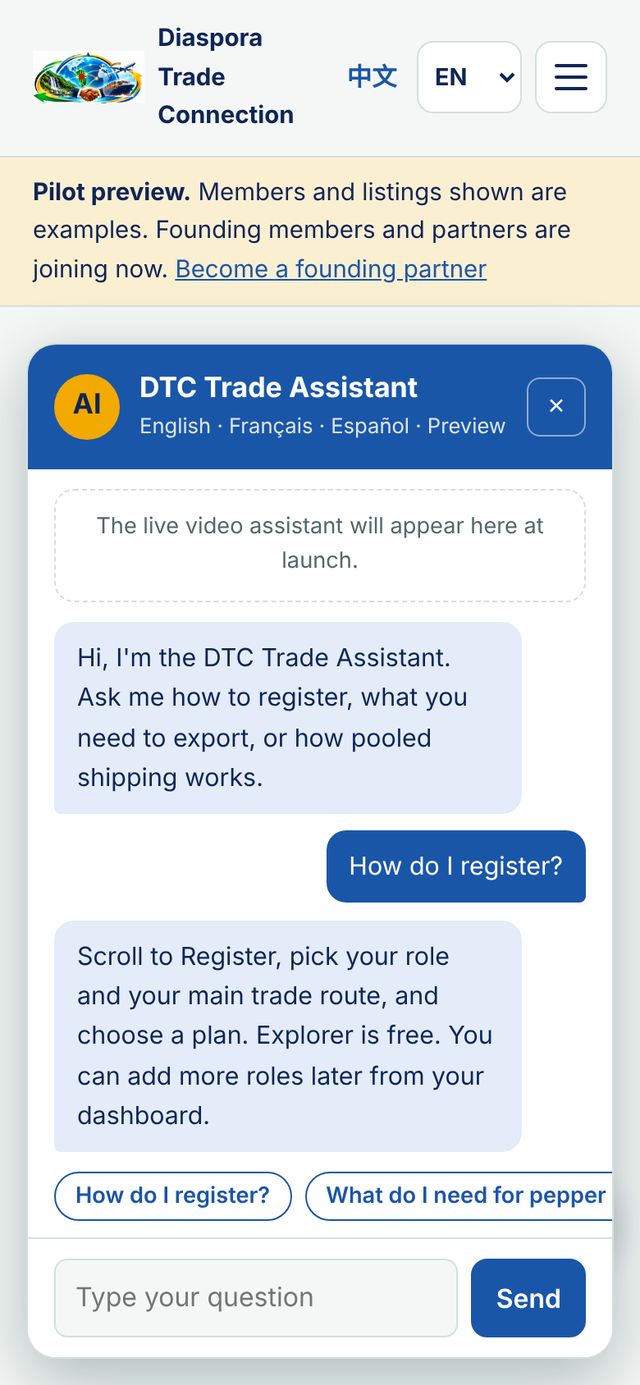
AI Trade Assistant
The Trade Assistant answering a question.

17Install the app on your phone

Put DTC on your home screen. It opens full screen like an app, loads fast and still opens with a weak signal. It's free and needs no app store.

Android (Chrome)

  1. Open the site. A bar appears at the bottom: Install the DTC app on your phone.
  2. Tap Install, then confirm. DTC appears on your home screen.
  3. No bar? Tap Chrome's โ‹ฎ menu โ†’ Add to Home screen or Install app.

iPhone (Safari)

  1. Open the site in Safari.
  2. Tap the Share button (square with an arrow).
  3. Tap Add to Home Screen, then Add.
Shortcuts. On Android, press and hold the DTC icon to jump straight to My dashboard, Document generator or Network board.
Install bar on iPhone
The install bar on an iPhone.

18Languages and the Chinese supplier page

The site works in English, French and Spanish, and has a separate page in Chinese for manufacturers in China.

  • Use the language box (EN / FR / ES) at the top. The site remembers your choice.
  • French is for Martinique, Guadeloupe, French Guiana, France and Haiti. Spanish is for Latin American suppliers and buyers.
  • Tap ไธญๆ–‡ to open the Chinese supplier page. Factories register there with their company, city, WeChat, minimum order and products.
Share the right link. Send Chinese suppliers straight to the ไธญๆ–‡ page, and French or Spanish speakers the normal link: they pick their language at the top.
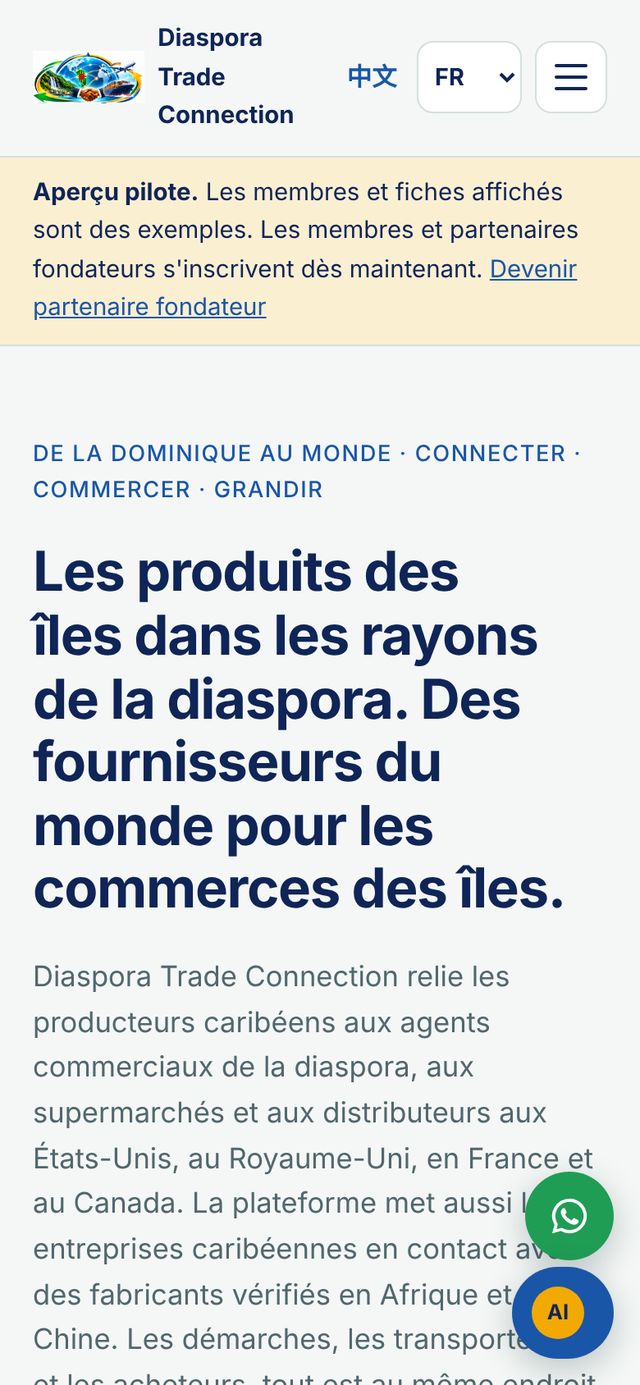
The site in French
The home page in French.
Chinese supplier page
The Chinese supplier page.

19Admin dashboard

For the DTC team. Every sign-up, verification and filing is tracked here, so nothing gets lost in WhatsApp or email.

What it shows

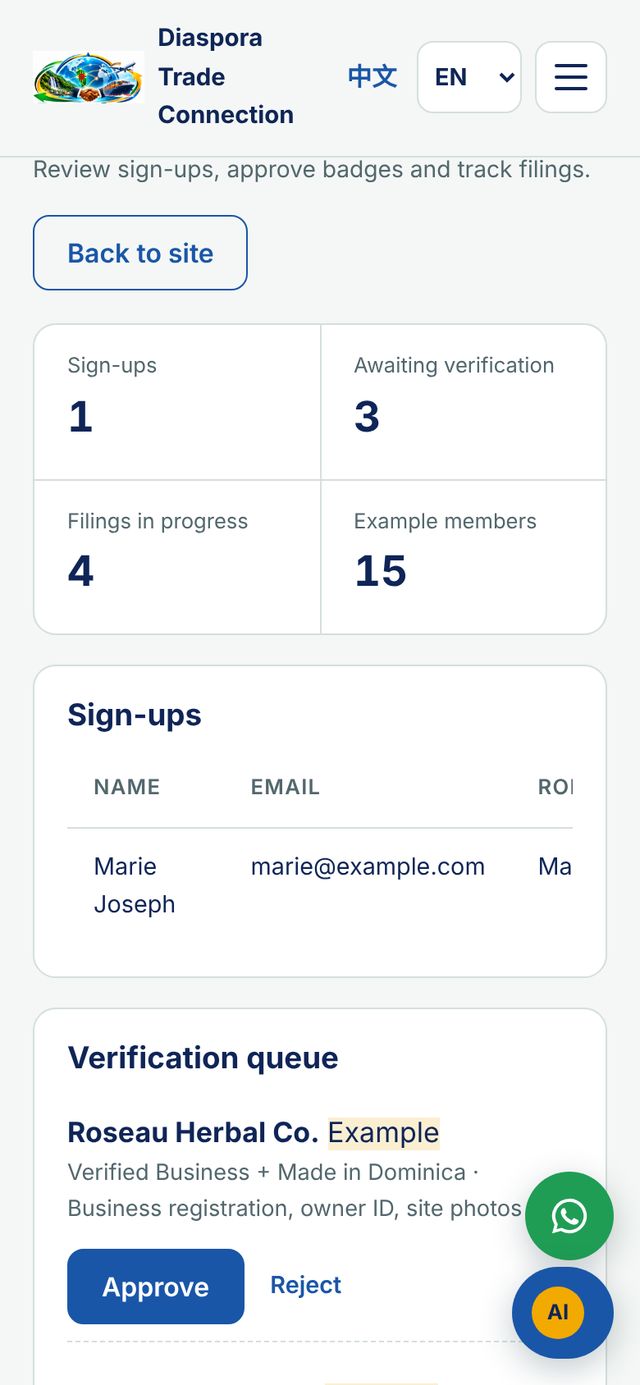
  • Totals: sign-ups, members awaiting verification, filings in progress and example members.
  • Sign-ups: name, email, role and route of everyone who registered.
  • Verification queue: check each business (registration, owner ID, site photos), then tap Approve or Reject. Approved makers get the Made in Dominica badge.
  • Filings tracker: every FDA, cosmetic and customs filing DTC is handling, with its status.

Handling a new member

  1. A new sign-up appears in Sign-ups. Contact them about founding-member pricing.
  2. If they ticked Made in Dominica, they appear in the Verification queue. Ask for their documents and check them.
  3. Tap Approve. Their listings now show the badge.
  4. When they order a service, add it to the Filings tracker and update the status as you go.
Admin preview. On the live site this page needs an admin login, and approvals are saved to the database.
Admin dashboard
The admin dashboard. (Example members.)

Your profile and policies

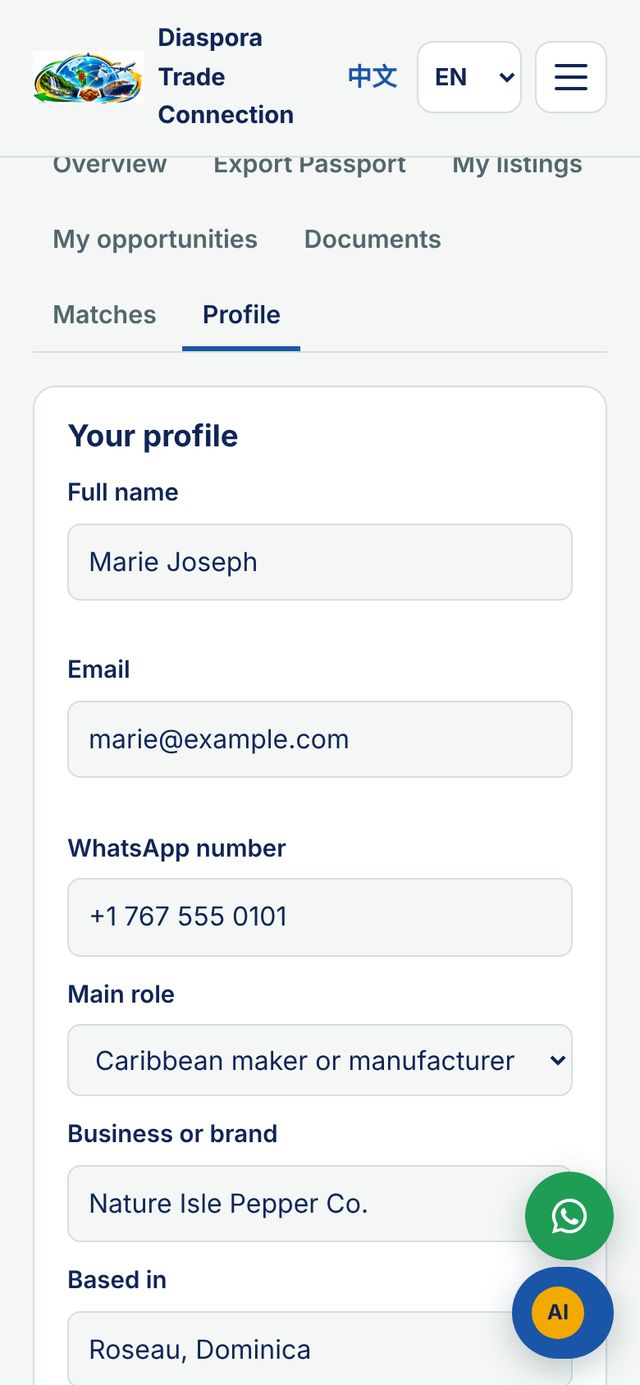
Every member can update their name, email, WhatsApp number, role, business, location, route and plan in Profile, then tap Save profile.

The site's Terms of Service, Privacy Policy, Guidance Disclaimer, Verification and Approval Policy and Community and Rep Guidelines are linked at the bottom of every page.

Profile tab
The Profile tab.

20Benefits

Who Diaspora Trade Connection helps, and how.

๐Ÿ‡ฉ๐Ÿ‡ฒ

Built from Dominica

Island makers first, with a Made in Dominica badge buyers can trust.

๐ŸŒ

The diaspora as a market

Reach shops, reps and distributors in New York, London, Paris, Toronto and beyond.

๐Ÿ“‹

Paperwork made simple

Route checklists, plain-language guides and documents filled in from your answers.

๐Ÿ’ฒ

Fair, clear prices

Small monthly plans, flat service fees at or below the market, commission only when a deal closes.

๐Ÿšข

Pooled shipping

Share a container or pallet so small makers pay less per case.

๐Ÿ›’

Cheaper sourcing

Island shops buy from Africa, China and Latin America, alone or in pooled orders.

๐Ÿ’ผ

Income for the diaspora

Reps earn commission selling island brands in their own cities.

๐Ÿค–

Help any time

An AI Trade Assistant and WhatsApp, in English, French and Spanish.

๐Ÿ“ฑ

Made for phones

Works on any phone and installs to the home screen.

21Quick answers

Short answers to common questions.

Is it free to join?

Yes. Explorer is free and lets you browse the board, read every guide, use the Export Passport and post one opportunity. Paid plans start at $5 a month.

Which plan should a maker choose?

Most makers choose Business at $8 a month. It adds product listings, the full document generator and pooled shipments.

Do I need an account to read the guides?

No. The Export Academy, the network board and the AI Trade Assistant are open to everyone.

Where is my information saved?

During the test phase, your dashboard is saved on the device you use, so use the same phone or computer. Accounts and logins come with the live site.

Does DTC file my FDA registration?

You can do it yourself for free on the FDA site with the help of the guide and worksheet, or DTC can file it with a US Agent for $349 a year.

What does "Made in Dominica ยท pending verification" mean?

You ticked Made in Dominica on a listing. DTC checks your business registration, owner ID and site photos, then approves the badge.

Are the documents official?

Invoices, packing lists and agreements are ready to use. FDA and cosmetic worksheets prepare your information; the filing itself is done on the official site or by DTC. Always check documents before sending.

How do diaspora reps get paid?

Reps agree a commission with the maker, usually 5โ€“10% of the deals they bring. Use the representation agreement in Documents to put it in writing.

How does pooled shipping work?

Several makers share one consolidated shipment with a partner forwarder. You pay the freight for your share plus 8โ€“12%, which is usually far less than shipping alone.

Is the landed-cost calculator exact?

No, it's an estimate. Your customs broker confirms the final duty and VAT, which depend on the HS code of your goods.

How do I get the app?

Open the site on your phone. On Android tap Install on the bar at the bottom; on iPhone tap Share, then Add to Home Screen.

How do I contact DTC?

Tap the green WhatsApp button on any page, or ask the AI Trade Assistant.

โ†‘